The elegant look of the Mashable website has enticed many theme developers to create a theme similar to Mashable as well as many bloggers want to have a website that look like Mashable. All thanks to the elegant Mashable design. Some of the theme developers have tried their hand on doing something similar but nothing is as appealing as the recently released Mashlife theme. If you are not convinced then a look at the demo site of Mashlife will definitely make you spellbound.
Mashlife WordPress theme is the first theme developed by Qlogix Solutions and they have done a fantastic job. Almost all the features available in Mashable has been cloned into Mashlife theme. So we regard Mashlife as the best Mashable clone theme.
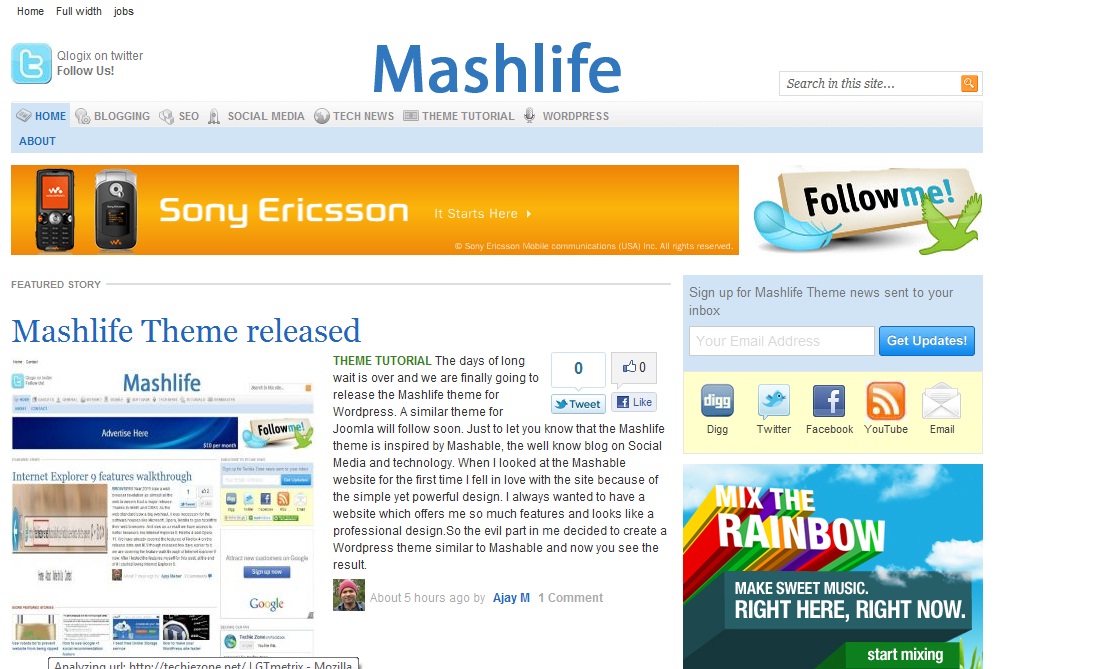
Mashlife is a clean, elegant looking and SEO optimized WordPress theme and have lots of customization option through Theme option in Admin panel without getting into the real code. Qlogix Solutions have also created many video tutorial as well as text based tutorials to help setting up the theme for newbies. Apart from that fantastic support is also available through email. So if you are looking for an amazing professional theme and ready to go online within minutes, Mashlife is the best theme choice for you.


Features of Mashlife theme:
Mashlife not only offers the look of Mashable but also offers many of the features available in it. let’s have a look at the amazing features:
General features:
– Compatible with the latest version of WordPress (3.1.2) and utilizes many advanced features like menu managment.
– Clean and elegant look
– Advanced theme control panel to customize various aspects of the theme
– Logo switcher between image/text and custom logo.
– Home page style selection between blog and magazine.
– Widgetized footer area and sidebar
– Author bio box for single posts.
– Automatic thumbnail creation and caching for better loadtime.
– Flexibility of thumbnail selection through custom filled for featured post.
– Integrated google analytics
– Integrated Gravatar support
Social Features:
– Built-in support for social media network and feedburner
– Built-in support for Open Graph protocol and Facebook like button.
– Integrated Facebook Like box in sidebar.
– SEO and adsense optmized
Advanced Features:
– Ads control through Theme control panel.
– Custom page template for full width page, job board etc.
– Advance features like custom post type to place job board like Mashable on the frontpage.
– Mashable like colored menu for categories.
– Support for lazy loading of images upon page scroll
– Support for related posts without any plugin.
– Amazingly fast loading to help in google ranking. (With the help of a caching plugin like W3 total cache it will be much faster and will give much better page speed score)
– Lots of new features to be added in the upcoming releases.
These are just some of the features of Mashlife theme and we feel unless you have a test drive of the Mashlife theme on your own, you will not be able to realize the true potential of this theme.
Mashlife theme is available for purchase in 3 different flavors, e.g Single use license to be used in only 1 website, multiple use license to be used in more than one website and developers license without any restriction.
Pricing:
Single License Mashlife theme: USD 39.9
Multiple site license mashlife theme: USD 99.9
Developer license Mashlfe theme: USD 149.9
If you are wondering, we are using an advanced version of Mashlife theme with developer license here in Techie Zone.
View Mashlife Theme Demo
Buy Mashlife Theme
Use the coupon Code TECHIEZONE while checking out to get a 15% discount.

14 replies on “Mashlife the best Mashable clone theme released”
Awesome template. I like it and i would like to buy template in future.
I want to buy, but there is no products available in the products page
Please inform me
Thanks
Hi, I’m using FreshLife theme in WP blog, and I liked this theme and thinking of buying it. thanks for sharing.
Hi,
This is a great theme. Please send me an offer so that I can have it for myself. Also I hope to tell some friends about it.
Thanks.
Would love to buy this theme but the qlogix site is down. Help!
i loveed the mashlife and i wana buy but the link isnt working so would u pls help me n tell me how to download n whats the payment procedure
thanks
I have installed mashlife theme to my website, http://www.kirfan.com here it the link.. The problem is i want to my post to be published about 2 or 3 links and then “Read More” option but unfortunity i can not modify the Read More option. Can you please help me to fix this problem ?
Thanks
I actually took this theme.. recoded most of it.. now it works like a charm and actually looks exactly like mashable… Not a bad theme. but if you dont know how to modify some basic parts of any theme.. then you need to go get a free theme and move on in life
So…. your site is down? Can’t see the Mashlife demo nor hit the Qlogix site.
Looks great but Demo doesnt works check that please.
Demo & Buy Links are not working. Where can I get this theme from?
The demo doesn’t work.
U demo link is not working,and by the way r u also using the same theme
Hi admin , i used this theme but i can’t see : box “Featured Images ” in dashboard.Help me